
Drive Smarter
Cedar ElectronicsMaps & Navigation
4.71.64K Reviews
- Version
- 4.9.1.0
- Installs
- 100.00K
- Age Rating
- Everyone
Screenshots
Our Review of Drive Smarter
 Analysis by Appyee
I would think of Drive Smarter less as a replacement for a navigation app and more as a companion for particular dash cameras. That distinction matters before you install it: its usefulness depends on owning a supported Cobra or Escort camera, rather than simply wanting another map on your phone. For the right driver, bringing camera-related tasks together in one place can make a routine drive easier to manage. For someone without compatible hardware, the central reason to use it largely disappears.
What the free download does—and what it costs
The app is free to download, which makes it relatively easy to try if you already use compatible equipment. It also offers in-app purchases priced from $4.99 to $49.99 per item. I would treat those as a separate decision rather than assume the download includes every possible paid option: the listed range gives a useful sense of potential spending, but it does not tell me which particular purchase suits every driver.
That distinction is practical. You can consider the core app without paying upfront, then decide whether any optional purchase is useful for your own setup. I would check the purchase details in the app before committing, especially if you only need basic camera management. Free access makes experimentation less of a gamble, but it is not a promise that every function or connected service is free.
Where the value comes from
Drive Smarter is a Maps & Navigation app from Cedar Electronics, but its clearest value is the link between a phone and supported in-car devices. It has a 4.6 average from around 11,000 ratings and more than 100,000 installs. Those figures suggest that it has found an audience, though I would still judge it by whether it fits the camera already in your car rather than by popularity alone.
For a compatible-camera owner, the appealing idea is having a phone-based route into camera-related tools instead of treating the dash cam as an isolated gadget. That can be handy when you want to check a recording or make sense of an event without handling camera controls while driving. I would do that review only once parked; even a useful companion app is not a reason to interact with a screen on the road.
There is also a sensible distinction between this and the usual navigation alternatives. A dedicated map app is the better pick when the main job is turn-by-turn directions, searching for places, or planning a route without a connected camera. Drive Smarter is more compelling when the camera is already part of your driving setup and you want the phone to support that equipment. I would not install it expecting a general-purpose maps app to replace the navigation tool I already rely on.
Fit, friction, and everyday use
The main trade-off is hardware dependence. Before spending time setting it up, I would confirm that my specific Cobra or Escort dash cam is supported and that I can complete the pairing process while safely parked. “Works with a camera brand” is not the same as “works with every model,” so checking compatibility first is the simplest way to avoid a frustrating install. If you do not own compatible equipment, a conventional navigation app is likely to be more useful.
A realistic use case is a regular commuter who has a supported camera and wants to review a clip after an unexpected stop or a minor road incident. The useful workflow is not to fiddle with the phone during the event: keep driving, pull over somewhere safe, then use the connected setup to inspect what the camera captured. That small change in habit makes the phone a practical follow-up tool rather than a distraction.
It may also suit someone who shares driving responsibilities or who wants a more convenient way to access camera recordings away from the dash. But the benefit depends on the connection working when needed, so I would test the pairing and learn where recordings appear before relying on the app for an important moment. A calm test in the driveway is a better time to discover a setup issue than the roadside after a stressful drive.
There are ordinary reasons to skip it, too. If your current camera already gives you a straightforward way to view and save footage, adding an app may not improve your routine enough to justify another account or setup step. If your priority is reliable directions, traffic-aware routing, or discovering places, a navigation-first app is a more direct fit. And if you drive without a compatible Cobra or Escort camera, the app’s central purpose is not aimed at you.
Who is likely to get the most from it?
I would put it on the shortlist for drivers who own a supported dash cam, regularly want to access its recordings, and are comfortable using a phone as a parked-car companion. It is less persuasive for people shopping for a dash cam-independent navigation solution. The app is free, but the value still comes from the equipment and workflow around it, not merely from installing it.
It is rated for Everyone, and the current version is 4.7.0.0, with Android 9 as the minimum operating system requirement. Those are useful compatibility checks before downloading, particularly if you use an older phone. The app has been available since August 11, 2020, so it is not a brand-new release, but I would still check that your phone and camera work together rather than assume age alone guarantees compatibility.
A New Era of Connected Driving
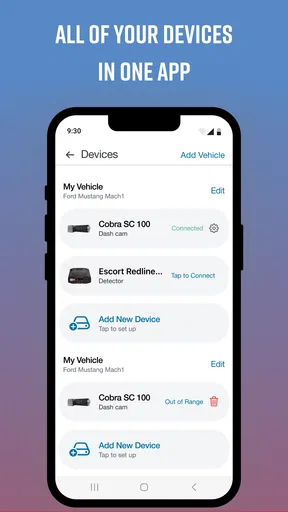
Imagine cruising down the highway with all your essential driving tools at your fingertips, seamlessly connected and ready to assist. That’s the promise of Drive Smarter. By linking your dash cam, GPS, and other smart devices, this app transforms your smartphone into a hub of convenience.
The app’s interface is clean and intuitive, which means you won’t have to spend hours figuring out how to navigate through it. The developers have clearly prioritized user experience, making sure that even the least tech-savvy among us can easily operate it.
Key Features You’ll Love
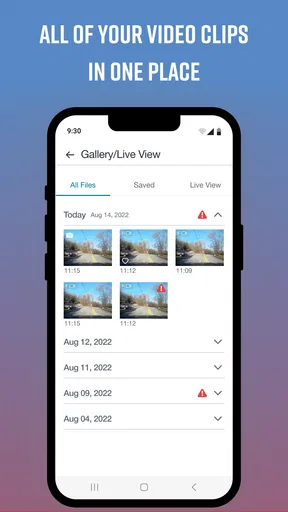
One of the standout features of Drive Smarter is its ability to manage video recordings from your dash cam. The app allows you to view, save, and even share footage directly from your phone. This is incredibly handy if you need to review an incident on the road or simply want to capture a beautiful scenic drive.
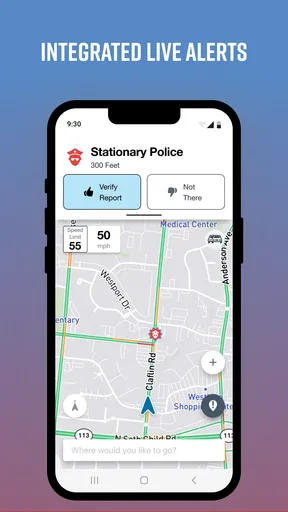
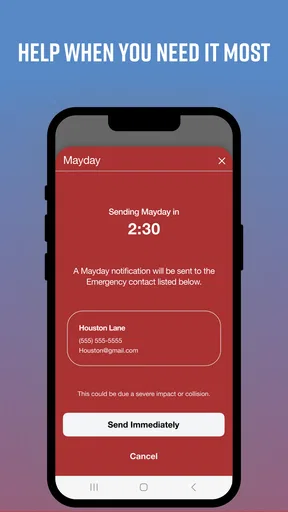
Another nifty feature is the real-time alerts. If your dash cam detects a potential threat, like sudden braking or a collision, you’ll get an instant notification. This proactive approach helps you stay aware of your surroundings and react quickly to potential hazards.
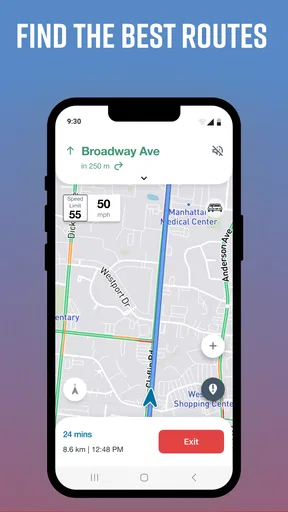
Moreover, Drive Smarter integrates seamlessly with GPS systems, offering you live traffic updates and rerouting options. This can save you from getting stuck in traffic jams and help you find the quickest route to your destination.
Staying Safe and Secure
Safety is a top priority for any driver, and Drive Smarter doesn’t skimp on security features. The app includes a feature that automatically saves video clips when a collision is detected, ensuring that vital evidence is preserved. Plus, all your data is encrypted, so you don’t have to worry about privacy breaches.
Installation is straightforward, and the app is compatible with a wide range of devices, which means you can get started with minimal fuss. Just pair your devices, and you’re good to go!
Final Thoughts: Is It Worth It?
So, is Drive Smarter worth a spot on your home screen? If you value convenience, safety, and efficiency while driving, then absolutely! The app does a fantastic job of bringing together all your smart driving tools into one cohesive platform. It’s not just about making driving easier; it’s about enhancing your entire driving experience.
In a world where we’re constantly on the move, having an app that simplifies and secures our driving routine is invaluable. With its robust features and user-friendly design, Drive Smarter is a must-have for anyone looking to take control of their drive.
Verdict
Strengths of Drive Smarter
- User-friendly interface for easy navigation.
- Real-time alerts enhance driving safety.
- Integration with multiple dashcams.
- Cloud storage for trip data backup.
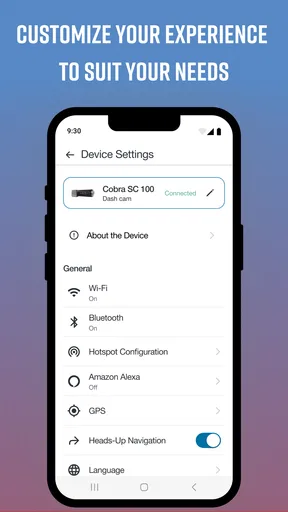
- Customizable alert settings.
Limitations of Drive Smarter
- Requires stable internet for real-time updates.
- Subscription needed for premium features.
- May drain battery quickly on long trips.
- Limited offline functionality.
- Occasional app crashes reported.
Similar Picks in This Category
View All
Uber - Request a ride
Uber Technologies, Inc.4.7


inDrive. Rides with fair fares
® SUOL INNOVATIONS LTD4.8

Yandex Go: Taxi Food Delivery
Mikromobilnost LLC Belgrade4.8

Bolt: Request a Ride
Bolt Technology4.8

Rapido: Bike-Taxi, Auto & Cabs
Rapido Bike Taxi4.8
Frequently Asked Questions
What is Drive Smarter and how does it enhance my driving experience?
Drive Smarter is a comprehensive app designed to improve your driving experience by offering features such as real-time traffic updates, route optimization, and safety alerts. It integrates seamlessly with your vehicle's system to provide a more informed and efficient journey, ultimately saving you time and enhancing road safety.
Is Drive Smarter compatible with all vehicles and smartphones?
Drive Smarter is compatible with most modern vehicles and smartphones. The app supports both Android and iOS platforms, and it connects to vehicles equipped with Bluetooth or smart infotainment systems. For the best experience, ensure your device and vehicle meet the app's compatibility requirements listed on the download page.
Does Drive Smarter require a subscription or any in-app purchases?
Drive Smarter offers both a free version and a premium subscription. While the free version provides basic features, the premium subscription unlocks advanced functionalities such as enhanced traffic alerts, personalized route suggestions, and ad-free usage. Users can choose to upgrade within the app for a monthly or annual fee.
How does Drive Smarter ensure user data privacy and security?
Drive Smarter is committed to protecting user data by employing robust encryption and privacy measures. The app only collects essential data necessary for its functions and complies with industry standards and regulations. Users can review and adjust privacy settings within the app to control data sharing and usage.
Can Drive Smarter be used internationally, and are there any limitations?
Yes, Drive Smarter can be used internationally, providing navigation and traffic updates in most countries. However, some features may vary based on regional availability, such as local traffic data accuracy and language support. Users are encouraged to check the app's regional capabilities before traveling to ensure optimal functionality.
